Text to 3D Model for 3D Printing
Describe one object in a sentence and set its height in millimetres. You get a watertight solid you can slice straight away, not a game asset you have to repair.
To turn text into a 3D model you can print, type one subject, its pose and a style, then set a height in millimetres. Most text-to-3D tools make textured game meshes that need repair; MeshShift returns one closed, watertight solid with a flat base, sized exactly, as STL or Bambu-ready 3MF. The first model each day is free to generate, preview and download as STL/3MF.
Next model $4.99, no account needed. Failed runs refund automatically.
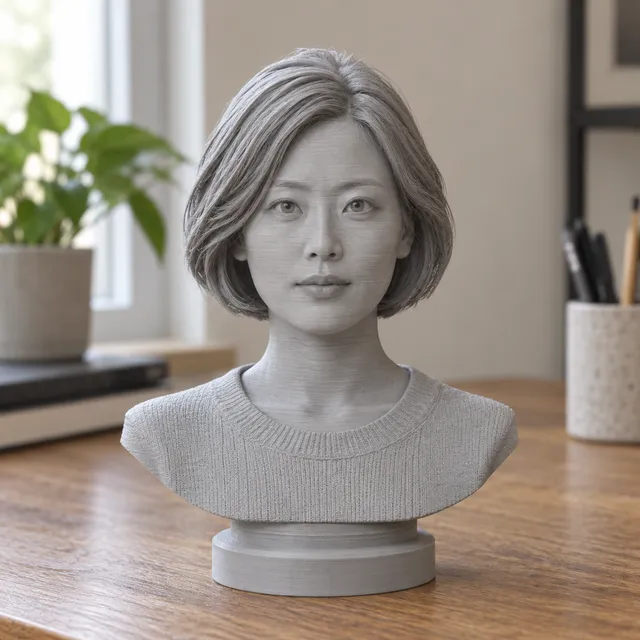
Your print-ready model appears here
Closed, manifold, flat-bottomed, on a base, and exactly the height you set.
In short: To turn text into a 3D model, type a short prompt that names one subject, its pose and a style, for example "a sleeping fox curled up, smooth cartoon style", then pick a height in millimetres. The MeshShift generator above builds the model in about a minute and shows a free 3D preview you can spin and measure.
Unlike most text-to-3D tools, which make textured meshes for games and screens, it is made for printing: the result is one closed, watertight solid with a flat base, scaled to the height you typed, and exported as STL or as a Bambu-ready 3MF. You do not need Blender, a repair step or an account. The first model each day is free to generate, preview and download as STL/3MF; more models use a one-time pack from $4.99 for three models, and failed runs are refunded automatically. For mechanical parts with exact dimensions, a CAD or OpenSCAD workflow is still the better route.
How to use the Text to 3D Model for 3D Printing tool
- Type one subject, its pose and a style.
- Set the height in millimetres and pick a base.
- Generate and check the free 3D preview from every side.
- Download the STL or 3MF and open it in your slicer.
| What you need to print | Typical text-to-3D tool (Meshy, Tripo, Luma) | ChatGPT + OpenSCAD | MeshShift text to 3D model |
|---|---|---|---|
| Organic shapes (animals, figures) | Yes | No | Yes |
| Closed, watertight mesh | Often open edges or inner shells | Yes, if the code renders | Always |
| Flat base | No | If you code it | Round or flat base added |
| Real size in mm | Arbitrary units | Yes | Exact height you type |
| Print formats | GLB, FBX, OBJ (STL on some plans) | STL after export | STL and Bambu-ready 3MF |
| Free to try | Limited credits, account needed | Free, software install | 1 free model a day, no account |
How text-to-3D works, and why printing needs more
A text-to-3D model first imagines the object from several angles, then builds a surface that matches those views. Most tools stop there: the mesh looks right on screen but often has open edges, floating bits, inner shells, no base and no real-world size.
A printer needs a closed solid. MeshShift adds that step for you: it fuses the surface into one watertight body, removes loose parts, flattens the bottom or adds a round base, and scales it to the millimetres you chose. That is the difference between a model you can slice in one go and one that needs an hour in a repair tool.
Prompts that turn into good prints
- **One subject:** "a corgi wearing a scarf" works; "a corgi in a park with a bench" does not.
- **Say the pose:** sitting, standing, curled up, waving.
- **Say the style:** chibi, cartoon, low-poly, realistic, smooth.
- **Avoid thin floating parts:** swords held away from the body, loose strings, separate hair strands.
- **Skip text on the model:** letters come out mushy; use the free text to STL tool for names and signs.
A height of 60 to 100 mm suits most figurines on an FDM printer. Go to 120 mm or more if the face matters, or print on a resin printer.
Text to 3D vs photo to 3D
Use text when you have an idea but no picture: a mascot, a dragon, a gift ornament, a tabletop prop. Use a photo when the model must look like something real, such as your dog, a toy or a person. Photo input gives the generator far more detail, so likeness is better; text gives you more freedom. Both routes in MeshShift return the same print-ready output, and you can switch between them with the tabs above the tool.
What you get in the download
- **STL:** one closed mesh in millimetres, ready for Cura, PrusaSlicer, OrcaSlicer or Bambu Studio.
- **3MF:** the same solid with units and orientation set, opening on the plate in Bambu Studio and OrcaSlicer.
- **Size you chose:** the height is exact, so you do not rescale in the slicer.
Before printing, you can still run the file through the free STL checker to see overhangs and thin walls, and add supports in your slicer as usual.
Where text-to-3D still falls short
AI sculpts by look, not by measurement, so it is not the right tool for parts that must fit something: hinges, threads, brackets, enclosures or replacement knobs. Use CAD or OpenSCAD for those. It also struggles with exact likeness of a named person from text alone, with readable lettering and with scenes of many objects. If a run misses, rewrite the prompt with fewer details and try again; failed runs are refunded automatically.
Frequently asked questions
Can I make a 3D model from text for free?
Yes. The first AI model each day is free to generate, preview and download as STL/3MF without an account. More models use a one-time pack from $4.99 for three models.
Is the text-to-3D model printable without repair?
Yes. Every model is closed and watertight with a flat base and an exact height in millimetres, so it slices without a repair step.
What file formats do I get?
STL and a Bambu-ready 3MF. Both are in millimetres with Z up.
Can text-to-3D make mechanical parts?
Not precisely. AI models are sculpted, not dimensioned. For brackets, boxes and fittings use CAD or ask ChatGPT for OpenSCAD code.
How long does it take?
About a minute per model. If a run fails, the credit is refunded automatically.



