STL to SVG Converter
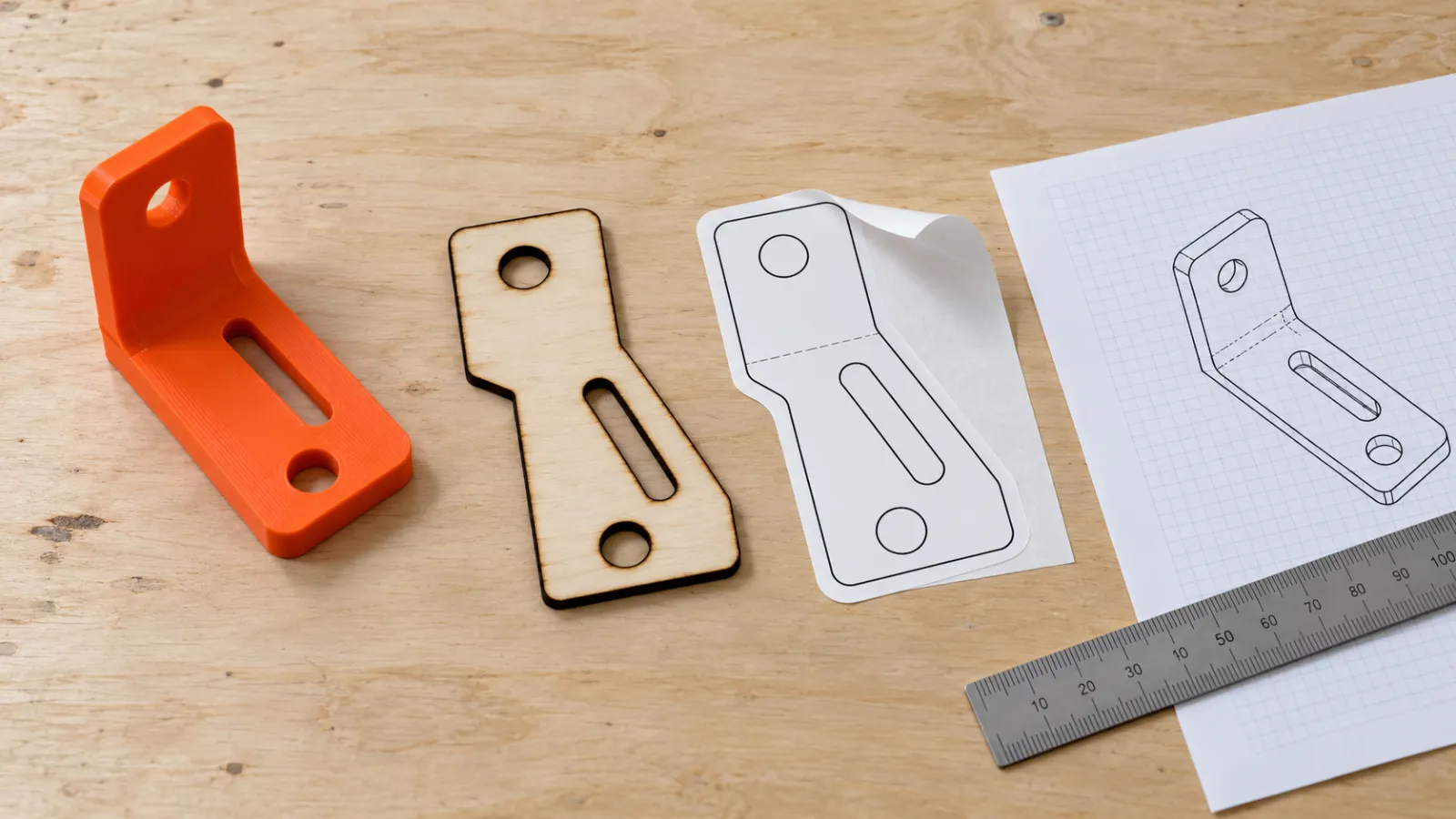
Turn an STL (or OBJ, 3MF, STEP) into a flat SVG for laser cutting, Cricut, stickers and drawings. Pick a view and get the outline, a slice or the edges at true size in millimetres, with the 3D model and the drawing side by side.
In short: To convert an STL to SVG, drop the STL on this page and pick a view: top, front, side or any angle you set. Then choose what to draw. Outline gives the outer silhouette as clean closed shapes, with holes that go through the part kept as holes, which is what a laser cutter, Cricut or sticker cutter needs.
Slice cuts the model at a depth you choose and draws the exact cross-section. All edges draws the sharp edges and silhouette as lines for a technical drawing. The SVG is written at the real size of the model in millimetres (or inches), starting at 0,0, and you can scale it to an exact width. Line width, simplification and filled or line style are adjustable, and the same drawing downloads as a DXF for CAD and laser software. The 3D model and the 2D result update side by side. Everything runs in your browser: no upload, sign-up, watermark or monthly limit.
How to use the STL to SVG Converter
- Drop the STL (or OBJ, 3MF, GLB, STEP) on the page.
- Pick the view: top, front, side, or Angle for a custom turn and tilt.
- Choose Outline, Slice or All edges, and check the drawing next to the 3D model.
- Set filled shapes or cut lines, line width, and the width in mm or inches.
- Download the SVG, or the DXF for CAD and laser software.
Outline, slice or edges: which one you need
- Outline (silhouette): the shape you would see as a shadow from that view. Use it to cut a part's footprint from plywood or acrylic, make a sticker or vinyl decal of a model, or draw a template for a base or a box insert. It is a set of closed paths, so Cricut Design Space and LightBurn treat it as a cut shape.
- Slice (cross-section): the exact profile where a plane cuts the model, for example the wall of a vase at half its height or the profile of a bracket. Use the depth slider to move the plane. A stack of slices is how people build layered plywood or cardboard models.
- All edges: creases sharper than the angle you set, plus the silhouette, as lines. It reads like a line drawing of the part and suits documentation, engraving or a quick sketch for a client. Edges on the back are hidden by default.
True size in millimetres
STL files store plain numbers, and almost every slicer and CAD program treats them as millimetres. MeshShift keeps that scale: a part that is 82.5 mm wide in your slicer gives an SVG whose width attribute is 82.5mm, so it imports at the right size in Inkscape, Illustrator, LightBurn and Cricut Design Space. Type a different width to scale the drawing, or switch to inches. Files that declare their own units (3MF, STEP, GLB) are converted to millimetres first.
Other online STL to SVG converters fit the drawing into a fixed box or draw every triangle of the mesh as its own path. Here you get the outline of the part, at its size, and nothing else.
STL to SVG for laser cutting and Cricut
For a laser cutter, choose Cut lines and a hairline width (0.01 to 0.1 mm); LightBurn, xTool Creative Space and Glowforge read thin strokes as cut paths. Filled shapes are better for engraving and for Cricut, which cuts around filled areas. Simplify lowers the number of nodes so the machine runs smoothly; 0.02 to 0.05 mm keeps the shape and removes the tiny steps that come from the triangle mesh.
The DXF download contains the same paths as AutoCAD R12 polylines: closed shapes for outlines and slices, open ones for edges. It opens in LightBurn, LaserGRBL, Fusion 360, AutoCAD, LibreCAD and most CAM programs.
3D model to SVG from other formats
The converter is not limited to STL. OBJ, 3MF, GLB, glTF, PLY, STEP and OFF files open the same way, so you can draw a 2D outline of any 3D model. Models from Blender or game engines usually stand with Y up; they are turned upright so Top means the view from above. Very large meshes take a few seconds longer because every triangle is drawn on your own device.
Going the other way
To turn a 2D SVG into a 3D printable part (a raised logo, a stamp, a cookie cutter or a sign), use SVG to STL, which extrudes the SVG shapes to the height you set. If you need the DXF of an image instead, PNG to DXF and JPG to DXF trace pictures into closed outlines.
Frequently asked questions
Is the STL to SVG converter free?
Yes. There is no sign-up, watermark, file limit or monthly quota, and the STL is processed in your browser, so it never leaves your device.
Can I convert STL to DXF?
Yes. Every drawing (outline, slice or edges) downloads as a DXF as well as an SVG. The DXF uses AutoCAD R12 polylines at real size with the unit set in the header, so it opens in CAD, CAM and laser software.
Why does my SVG show only the outside shape?
That is the Outline drawing: the silhouette from the chosen view. Holes that go all the way through the part in that view stay as holes. For inner walls and pockets use Slice and move the depth slider, or All edges for a line drawing.
Will the SVG be the right size?
Yes. The SVG width and height are written in millimetres (or inches) at the model's true size. STL has no unit field, so the numbers are read as millimetres, which is what slicers and most CAD programs use.
How do I get a side view or an angled view?
Pick Front or Side, or choose Angle and set the turn and tilt. Top looks straight down, Front looks from the front, and Side from the right. The drawing updates next to the 3D model as you move the sliders.
Is my STL uploaded anywhere?
No. The model is read, projected and written as SVG or DXF inside your browser tab. Nothing is sent to a server, which suits client parts and designs under NDA.



