Photo to 3D Print: From a Picture to a File Your Printer Accepts
Upload a photo and get a closed, printable model sized in millimetres: a full 3D figure with the AI tool, or a free flat relief or lithophane in your browser.
Next model $4.99, no account needed. Failed runs refund automatically.
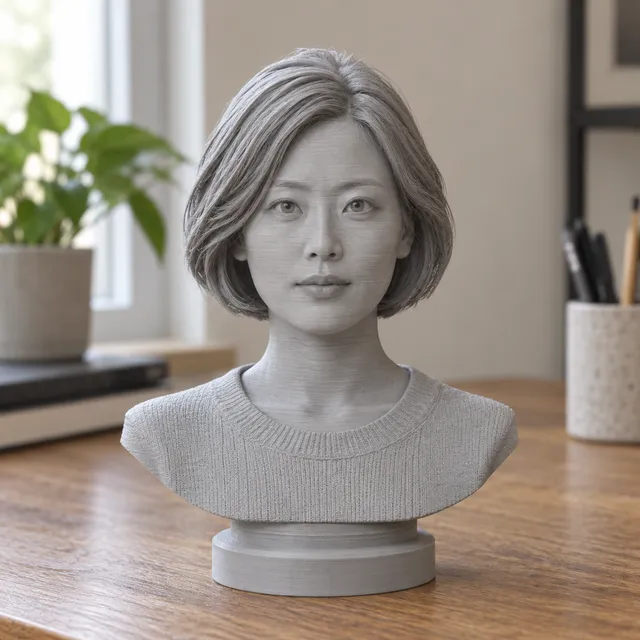
Your print-ready model appears here
Closed, manifold, flat-bottomed, on a base, and exactly the height you set.
In short: To turn a photo into a 3D print, upload the picture to the MeshShift AI tool, pick a figurine, bust, keychain or plain model and set the height in millimetres. The AI predicts the sides and back that the photo does not show and builds one watertight solid with a flat base, so it slices without repair.
Check the free 3D preview, then download an STL for any slicer or a 3MF that opens in Bambu Studio, OrcaSlicer and PrusaSlicer at the right size. The first model each day is free, download included with no sign-up. If you want a flat print instead, such as a lithophane that shows the photo when lit from behind or a relief plaque, the free image tool makes one in your browser without uploading the photo. Either way you skip the usual steps of modelling, scaling, adding a base and fixing holes that most photo to 3D generators leave to you.
How to use the Photo to 3D Print tool
- Upload a clear photo of one subject.
- Pick figurine, bust, keychain or plain, and set the height in mm.
- Wait about a minute and check the free 3D preview from every side.
- Download the STL, or the 3MF for Bambu, Orca or Prusa.
- Slice it and print; supports are usually needed under arms and chins.
Which kind of print fits your photo
- **Full 3D figure (AI):** pets, people, toys and objects you want to stand on a shelf. The back and sides are predicted, so the model is a complete solid on a round or square base.
- **Bust (AI):** head and shoulders on a plinth, the best choice when the photo is a portrait.
- **Keychain (AI or free):** a small charm with a loop. The AI version is a rounded figure; the free version is a flat relief or raised outline.
- **Lithophane (free):** a thin panel that shows the photo when a light is behind it. Best for portraits, landscapes and memorial gifts.
- **Relief or stamp (free):** embossed plaques, coasters, signs and logos.
Rule of thumb: if you want to hold the subject, use the AI tool. If you want to hang it on a wall or put it in front of a lamp, use the free image tool.
What makes a 3D model actually printable
Many photo to 3D generators give you a mesh that looks fine on screen but fails in the slicer. A printable file needs four things:
- **Watertight:** a closed surface with no holes, so the slicer knows what is inside.
- **One shell:** no floating pieces or overlapping parts.
- **A flat base:** something that sits on the bed without a raft.
- **Real size:** a height in millimetres, not arbitrary units that import 1000 times too small or large.
MeshShift checks all four before you download. The model is closed and merged, sits on a flat base and is exported at the height you chose. The 3MF keeps the units, which is why it opens at the right size in Bambu Studio.
Photos that print well
- One subject, fully in frame, nothing cropped at the edges.
- Soft, even light. Hard shadows can be read as shape.
- A plain background that contrasts with the subject.
- Shot straight on at roughly mid-height, not from far above.
- No heavy filters, motion blur or reflections.
Pets, people in simple poses, toys and statues give the best results. Transparent objects, thin wires and crowds do not. If the first result misses something, a second photo from a slightly different angle usually helps more than editing the same picture.
Printer settings for a photo figure
For an FDM printer, use PLA at 0.12 to 0.16 mm layers, 15 % infill and tree supports. An 80 mm figure takes about 3 to 5 hours on a Bambu A1 or P1S. Faces need at least 60 to 80 mm of height to keep their features; below that, choose a bust so the head is larger. For resin printers, hollow the model in your slicer and add drain holes. Paint brings back colour: a grey primer, then acrylics, takes an evening and makes a big difference for pets.
How it compares with other ways to get a photo printed
Commissioned sculpts from a photo cost $40 and up and take days. General AI 3D generators are free or cheap but leave you to scale the model, add a base and repair holes, and some only export GLB or OBJ. Desktop photogrammetry needs dozens of photos from every angle. MeshShift needs one photo, shows you the result before you pay, and gives a print-ready file with exact size. The first AI model each day is free, download included; after that, one-time packs start at $4.99 for three models with no subscription.
Frequently asked questions
Can I 3D print a photo for free?
Yes. The first AI model each day is free, download included with no sign-up, and the image tool makes lithophanes, reliefs and stamps from any photo for free, with no limit and no watermark on the STL.
How many photos do I need?
One. The AI predicts the sides and back from a single photo. A clear, front-on picture with the whole subject in frame gives the best shape.
Will the file work with my Bambu Lab printer?
Yes. Download the 3MF and open it in Bambu Studio; it imports at the height you chose with a flat base on the plate. The STL works in Bambu Studio too, as well as OrcaSlicer, PrusaSlicer and Cura.
Is my photo kept or made public?
No. Photos for the AI tool are used only to build your model and are deleted afterwards. The free image tool never uploads the photo at all.
Can it print in colour?
The model is a single-colour solid, which suits PLA, PETG and resin. Paint it after printing, or split colours in Bambu Studio with the paint tool if you have an AMS.



