Turn a Photo Into a 3D Printable Bust
Upload a portrait, choose the Bust template and get head and shoulders on a plinth, as one closed solid at the height you choose.
Sign in with Google → first model free. Failed runs refund automatically.
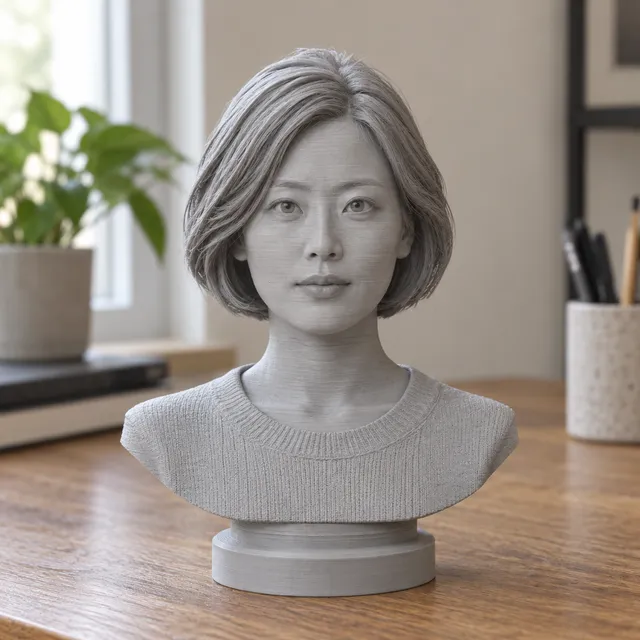
Your print-ready model appears here
Closed, manifold, flat-bottomed, on a base, and exactly the height you set.
How to make a bust from a photo
- Choose a portrait where the face looks toward the camera, the head and shoulders are fully in frame, and the light is soft and even.
- Upload it and select the Bust template. If the engine supports several angles, a three-quarter view and a profile improve the shape of the nose, ears and the back of the head.
- Enter the total height in millimetres, including the plinth. 60 to 120 mm is a common desk size.
- Review the result in the viewer. You can change height, plinth and hollowing as often as you like without new credits. Export STL for most slicers or 3MF if you print on a Bambu Lab or Prusa machine.
Getting a better likeness
Likeness comes mostly from the photo. Faces lit from one side get deep shadows that the AI can read as dents or bumps, so daylight near a window, with the subject facing it, beats a flash. Remove sunglasses and hats if you want the face, and avoid wide-angle selfies held close to the face, which stretch the nose and shrink the ears.
Neutral or slightly smiling expressions print better than wide-open laughs, because teeth and deep mouth openings become hard-to-print cavities. Long loose hair is simplified into larger shapes; tied-back hair keeps the head silhouette cleaner. If the first result is close but not right, try a different photo rather than the same one again.
Printing a bust: FDM and resin settings
On FDM printers, print the bust upright on its plinth. A 0.4 mm nozzle at 0.08 to 0.12 mm layers keeps eyelids, lips and hair texture. Chin and nose overhangs need supports; in Bambu Studio or OrcaSlicer, tree supports with a 30 degree threshold and a 0.2 mm top Z distance peel off cleanly. PrusaSlicer organic supports and Cura tree supports work the same way. Matte PLA in white or grey shows facial shape best.
On resin printers, enable hollowing with a drain hole, then tilt the bust backward 15 to 30 degrees in Chitubox or Lychee so the face carries no support marks. A bust 80 mm tall typically fits on the build plate of most entry-level resin printers.
Consent, rights and what is not allowed
A bust is a lasting likeness of a real person, so ask before you print someone. Only upload photos you took yourself or have permission to use, and get the person's agreement, or a parent's for a child. Gifts for family, memorials and portraits of yourself are typical uses.
MeshShift does not allow busts of public figures, sexual content, or minors in any suggestive context. Licensed characters may be printed for personal use only. These rules exist to protect the people in the photos.
Privacy and cost
Your portrait is used only to create the model, never stored by MeshShift, never used to train AI and never made public. The finished bust stays in My models for 30 days for re-downloads.
A bust is 10 credits. Packs are one-time purchases: $4.99 for 4 models, $9.99 for 10 and $24.99 for 30. Signing in with Google gives one free model. If a generation fails, the credits come back automatically, and a pack with no credits spent can be refunded within 14 days.
Frequently asked questions
Can I make a bust of a person from one photo?
Yes. One front-facing portrait is enough for a recognisable face. The back and sides are estimated, so hairstyles and ears may differ from reality. Adding a side or three-quarter photo, when the engine supports multiple angles, improves the overall shape.
Can I make a bust of a celebrity?
No. Busts of public figures are not allowed. Use photos of yourself, of people who have agreed to it, or of family members where you have the right to use the photo.
What size should I print a bust?
Around 60 to 120 mm tall including the plinth suits a desk or shelf and shows the face clearly at fine layer heights. Below about 40 mm, eyes and lips become hard to resolve on FDM printers. You set the height in mm and can change it later without spending credits.
Is the bust hollow?
By default it is solid, which suits FDM printing where infill keeps it light. For resin printers you can turn on hollowing, which leaves a shell and adds a drain hole so uncured resin can escape. You can switch this on a finished model at no extra cost.
Can I paint the printed bust?
Yes. Print in light grey or white, sand lightly, apply a spray primer and paint with acrylics. Resin prints take paint with less sanding because layer lines are much finer than on FDM.